Event Logs
Describes how to view event logs generated by the device.
Search event logs
Set conditions to search logs.
-
Press ESC, enter the password, and access the menu.
-
Select EVENT LOG → Search and press 6.
-
Select the desired item and press 6 to change the setting.
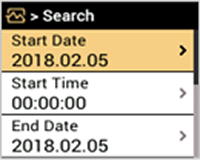
-
Set the search conditions and press OK to display the logs that match the conditions.
-
Press ESC to return to the previous screen.
Delete all logs
You can delete all saved logs.
-
Press ESC, enter the password, and access the menu.
-
Select EVENT LOG → Delete All Logs and press 6.
-
Press OK to delete all logs. Press ESC to cancel.
View log usage
You can check the status of log usage.
-
Press ESC, enter the password, and access the menu.
-
Select EVENT LOG → Log Usage and press 6.
-
You can check the log usage of the device.
-
Press ESC to return to the previous screen.