Last updated |
Admin Menu
Provides guidance on the main menus and features accessible with administrator privileges.
Top icon

| Name | Feature description |
|---|---|
 (RTSP) (RTSP) | Icon indicating that the device is streaming live video through RTSP |
 (WLAN) (WLAN) | Icon indicating that WLAN communication is connected |
 (Connecting to Suprema CLUe) (Connecting to Suprema CLUe) | Icon indicating that the device is connecting to Suprema CLUe |
 (Suprema CLUe) (Suprema CLUe) | Icon indicating that the device is connected to Suprema CLUe |
 (RS-485) (RS-485) | Icon indicating that RS-485 communication is connected |
 (TCP/IP) (TCP/IP) | Icon indicating the TCP/IP communication connection status |
Dashboard
Info
When using Suprema CLUe mode, user enrollment, editing, and deletion are available only on the Suprema CLUe server, not on the device.
-
Press
 , enter the password, and enter the menu.
You can check the status and information of the device at DASHBOARD. Alternatively, you can press Enroll Wizard to directly enroll a user.
-
To register a user or set up a device, select the desired menu from the bottom of the dashboard.
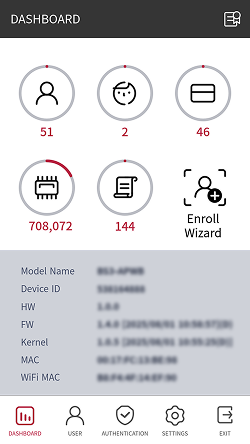
Info
-
If Menu Password is not set, pressing
opens the DASHBOARD screen. For details on how to set the password, refer to Menu password. -
WiFi MAC can only be confirmed on the BS3-APWB model.