Maintenance and Care
This guide explains how to reset the camera to factory settings and replace the desiccant module.
Factory reset
Deletes all information stored on the camera and resets all settings.
-
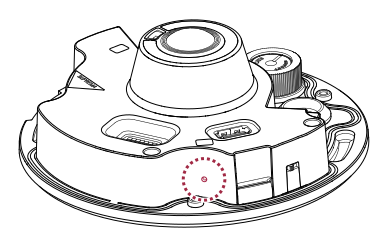
After connecting the camera to power, locate the reset button.
-
Press and hold the reset button for at least 5 seconds, then release it.
-
After the factory reset completes, the camera will restart automatically.
Performing a factory reset will delete all user data and settings, including network settings.
-
By default, the IP address is configured via DHCP.
-
If the device does not get an IP address after a factory reset, it changes to the default IP address (
https://192.168.1.100), so connect using that address.
Replace the silica gel module
To maintain dehumidification performance, we recommend replacing the desiccant module at least every 1 year.
-
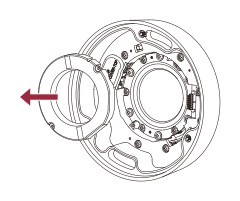
Remove the used silica gel module from the cover.
-
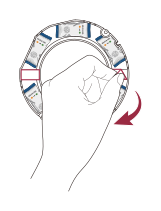
Remove the protective film from the back of the new silica gel module.
-
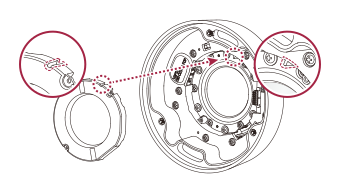
Align the groove on the silica gel module with the protrusion on the cover. Attach it, and press firmly until it attaches securely.
-
The desiccant module comes in sealed packaging. Exposure to air can reduce dehumidification performance. Open the package just before attaching it.
-
Replacement intervals may vary depending on the installation environment.
-
Record the replacement date to keep track of the next replacement.
-
Replacement desiccant modules can be purchased from the retailer where you bought the product.