Enroll Fingerprint
You can enroll the user's fingerprint as a means of authentication for access control. Enroll the user's fingerprint information through a device that supports fingerprint authentication. Fingerprints can be scanned on devices equipped with fingerprint scanners.
Before enrolling fingerprints...
-
Ensure that the user's fingerprint is clean and dry.
-
Do not enroll fingerprints that are injured or blurry.
In the Credential section, click the + Fingerprint button. When the Enroll Fingerprint window appears, configure each item and click the Enroll button.

-
Device: Select the device for enrolling the fingerprint.
-
Quality: You can adjust the fingerprint enrollment quality. Cannot enroll fingerprint information if it does not meet the configured quality level.
-
View Image: The original image of the scanned fingerprint can be viewed in area .
-
+ Add: Click the button to add a fingerprint. A maximum of 10 fingerprints can be enrolled.
-
Scan: Select the added fingerprint number and click the button. Place your finger on the fingerprint scanner or device sensor to scan the fingerprint.

-
Delete: This allows deleting an enrolled fingerprint. Select the fingerprint number to delete and click the button.
-
Validate: You can check if it is a previously enrolled fingerprint.
-
Duress: To enroll a fingerprint as a duress fingerprint, select this option and scan the fingerprint. If you are threatened or forced to open the door, you can use that fingerprint to send a notification.
-
Do not use the fingerprint you use for everyday access as a threat fingerprint.
-
When activating the View Image option, you can view the fingerprint image, but it is not stored in BioStar.
-
If the fingerprint authentication rate is low, delete the fingerprint and enroll a new fingerprint.
-
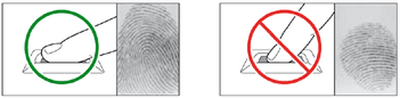
To achieve good quality fingerprint, ensure your finger covers the entire surface of the fingerprint recognition sensor. Use the fingerprints of the index or middle finger.