Register License Key
If you purchased the BioStar X license, you can register the license key and use more features.
Navigate to Settings → License → BioStar X License.
The method to activate BioStar X License varies depending on your network environment. Check your network status and activate your license according to the provided instructions.
-
Certain features such as adding users, doors, and ports are restricted when the license is not registered.
-
For more information the License menu, see Activate License.
-
For more information on the licensing policy, see License Policy.
-
For more information about license error codes, refer to the following link.
Register online
The license key accepts only numbers and hyphens (-). Enter up to 16 digits in the 1111-1111-1111-1111 format.
Register a single license
To activate the BioStar X license while online with an internet connection, enter your name and the received license key, then click Activate.

Register multiple licenses
Add up to 30 licenses at a time. Click the Add More License button. After entering all licenses, click Activate.
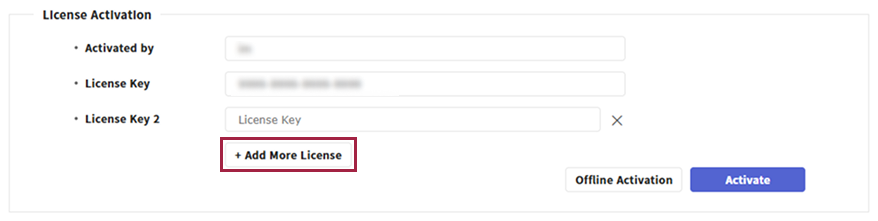
-
When the number of fields reaches 30, the Add More License button becomes disabled. You cannot add more licenses.
-
Paste multiple license keys into the fields at once. The system detects only keys in the
1111-1111-1111-1111format and splits them into each field. -
If the pasted keys exceed 30, only the first 30 are entered automatically. Extra keys are ignored.
Activation progress
Click Activate to open the progress pop-up. Do not close the page or popup until activation completes.
Register offline
To activate the BioStar X license in a closed network environment or in an offline state with limited internet access, please follow the instructions below.
-
Enter any registration manager name for registration and the license key in the License Activation section.
-
The license key accepts only numbers and hyphens (
-). Enter up to 16 digits in the1111-1111-1111-1111format. -
Save or write down the administrator name and license key.
-
If you need multiple licenses, click the Add More License button to add them.
-
-
Click Offline Activation.

-
When the Activate License Offline window appears, click No, I need to issue a file (*.lic)..
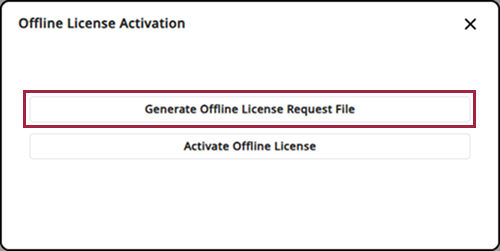
If an issued license file is available, click Yes, I already have a license file. on this screen, then go to step 9.
-
When the license request file (*.req) is created, download it to the local disk.
-
Send the downloaded request file to the reseller and request an offline activation file (*.lic).
-
After receiving the offline activation file, enter the administrator name and license key from step 1 in the License Activation section.
-
Click Offline Activation.
-
When the Activate License Offline window appears, click Yes, I already have a license file..
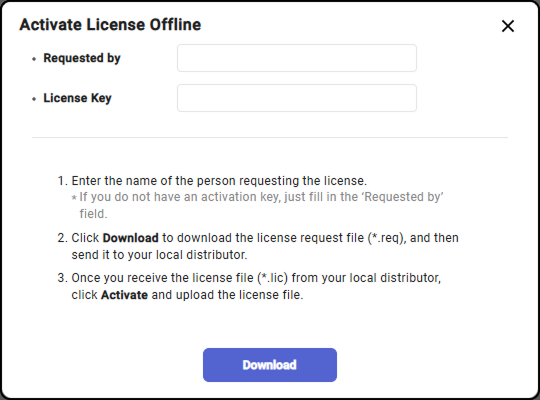
-
When the Open File window appears, select the offline activation file (*.lic) or the compressed file (*.zip) stored locally.
If you request multiple licenses, you may receive a compressed file.
-
A progress status pop-up appears. Do not close the page or popup until activation completes.