Last updated |
Delete Visitors with Expired Personal Data
Delete visitor information after the personal data retention period expires.
-
On the Launcher page, click Visitor.
-
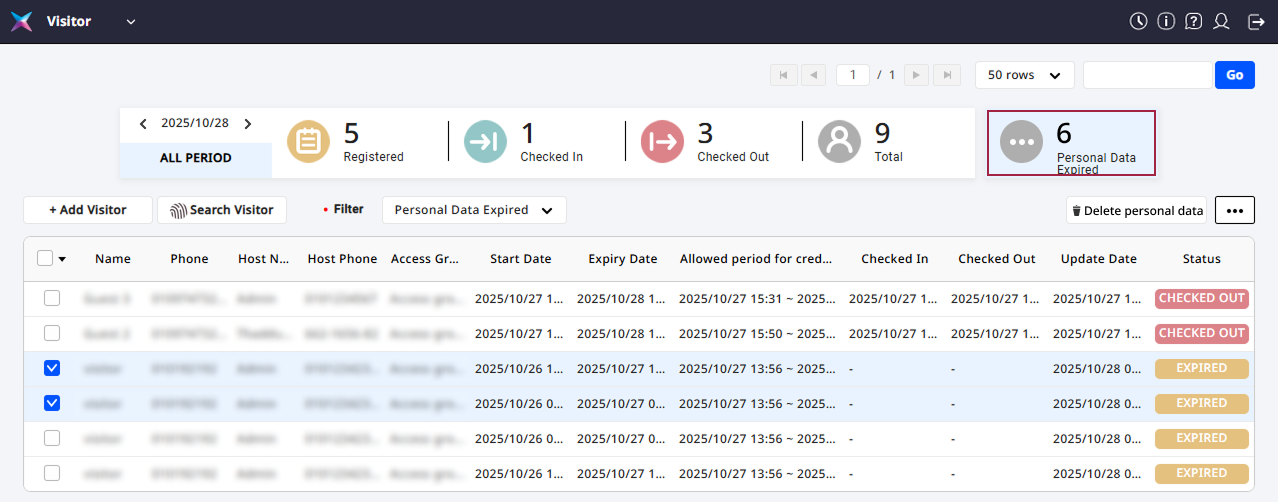
Click the Personal Data Expired tab at the top of the screen.
-
When the list of visitors whose personal data retention period has expired appears, select the checkbox for the visitor to delete. You can select one or more visitors.
-
Click Delete personal data in the top right of the visitor list.
-
When the confirmation message appears, click Yes.
Info
-
Only users with Administrator permission can view the list of visitors with expired personal data. For more information about user permissions, see Register Users.
-
For more information about setting the personal data retention period, see Configure Visitor Settings.