CLUe API Guide
This document helps you integrate with Suprema CLUe API quickly and easily. This guide provides the basic information needed to use the CLUe API, from how to issue API keys to request and response formats, error codes, and rate limits. The CLUe API works with Suprema CLUe portal settings. If you do not have a CLUe portal account, request one first.
What is an API key
An API key is required to call the CLUe API. You can issue one from the administrator menu for the place group. CLUe API requires an API key as a Bearer token in the request header. You can issue and manage API keys in the CLUe portal.
To sign up, get an invitation from a higher-level administrator or an administrator in the same place group.
What are Place and Place Group?
Because CLUe supports a multi-tenant system, a Place refers to an independent unit such as a company or Branch, and a Place group is a higher-level concept that manages multiple Places together.
Generate an API key
-
Log in to the CLUe web portal.
-
Select the place group for API integration.
-
Click → Settings in the upper right of the screen.

-
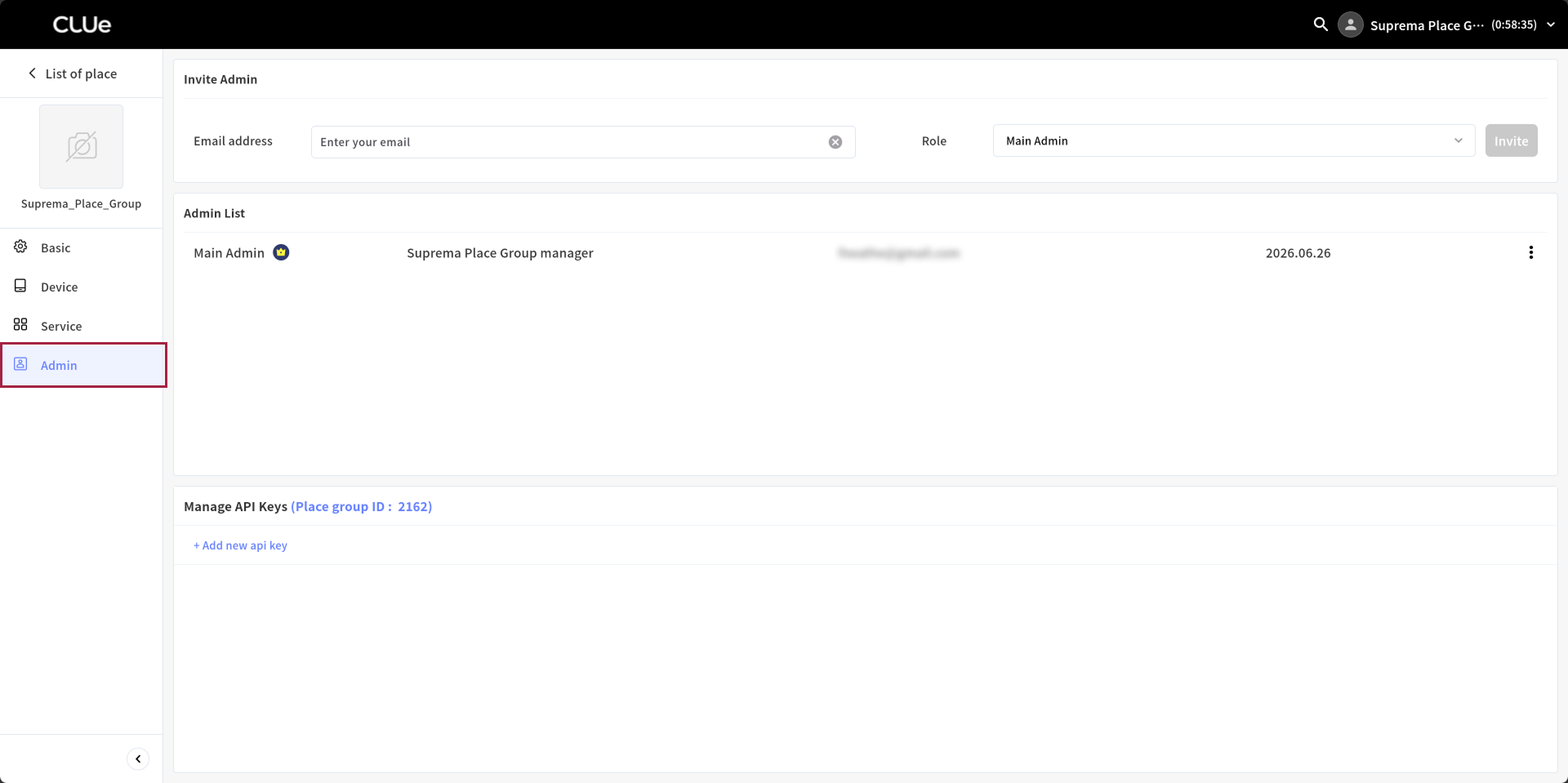
Click Admin in the left sidebar.
-
In the Manage API Keys section, click + Add new api key.
-
Select the desired validity period.

If you select Custom, you can set the validity period for up to 365,000 days.
-
To issue a new API key, click the Add button.
-
When the new API key is created, click the Copy button and use it as a Bearer token when calling the CLUe API.

The API key grants access to the CLUe API, so keep it secure and do not expose it externally. Suprema is not responsible for problems caused by misuse.
CLUe API basics
Base URL
The base URL for all API requests is https://api.moon.supremainc.com/v1. Send all API requests over HTTPS.
CLUe API follows RESTful principles as much as possible and performs most operations on pages and database resources with GET, POST, PATCH, and DELETE requests. The request body and response body are both encoded in JSON.
API success response
When the response succeeds, the following status is returned.
HTTP status code: 200
| Field | Description | Optional |
|---|---|---|
code | API response code | |
status | API response status | |
message | API response message | true |
data | API response data | true |
API failure response
When the response fails, one of the following statuses is returned.
HTTP status code: 400 / 500
| Field | Description | Optional |
|---|---|---|
errors | API failure response | |
errors.code | Failure error code | |
errors.message | Failure reference message | |
errors.details | Failure details | true |
Common error codes
| Code | Description |
|---|---|
e1000 | Internal server error |
e1001 | Permission denied |
e1002 | Not supported |
e1003 | Invalid format |
e1004 | JSON parse error |
e1005 | Invalid method argument |
e1006 | Bad request |
e1007 | Resource not found |
e1008 | Method argument type mismatch |
e1009 | Missing request header |
API rate limits
CLUe limits each API to 300 calls per 5 minutes, and this limit applies per call source. However, APIs that add facial images include processing tasks such as template extraction and generation, so we recommend waiting a short time between calls.