Introduction
For more details on the functionality of XProtect VMS and XProtect Smart Client, see the manuals for Milestone software.
Target Audience
This document is intended for system operators as well as system administrators and describes the integration between Suprema BioStar X and Milestone XProtect. The system operators/administrators require a basic knowledge of Milestone XProtect and an in-depth knowledge of Suprema BioStar X.
The MIPAccessControl plugin provides seamless integration between Milestone XProtect and Suprema BioStar X access control systems. This guide describes how to install, configure, and operate the plugin to monitor access control events, manage devices, and control doors, elevators, and security zones.
Features
Suprema's BioStar X is the powerful web-based security platform that provides the ability to integrate with third-party systems easily. This integration is based on Suprema's BioStar X server and enables operators to display the access control events and alarm on the XProtect Smart Client.
With the full features of BioStar X, XProtect VMS creates a comprehensive access control solution. Furthermore, by coupling video and access control events, operators can control cameras and view real-time video and recorded video from one easy-to-use interface.
Suprema Integration with Milestone XProtect provides the following features:
-
Management and administration for users, doors, zones, and elevators with XProtect Smart Client.
-
Monitor real-time events: Track door access, violations, alarms, and system status.
-
Control devices: Lock and unlock doors, enable and disable elevators, and arm or disarm zones.
-
Manage cardholders: View user information, photos, and access permissions.
-
Receive alerts: Receive notifications for security events and system changes.
-
View live and historical access control events from within Milestone software and allows the operator to search for historical events with a range of parameters.
-
-
Acknowledge the access control alarm of BioStar X in XProtect Smart Client.
-
Open and close the doors through the Maps function of the XProtect Smart Client.
System Diagram
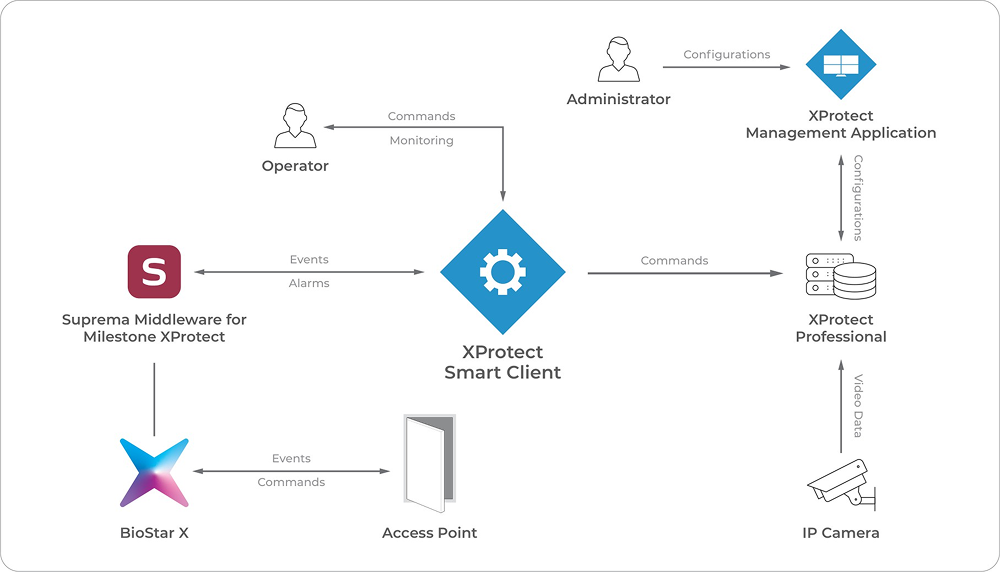
Structural differences between BioStar X and XProtect
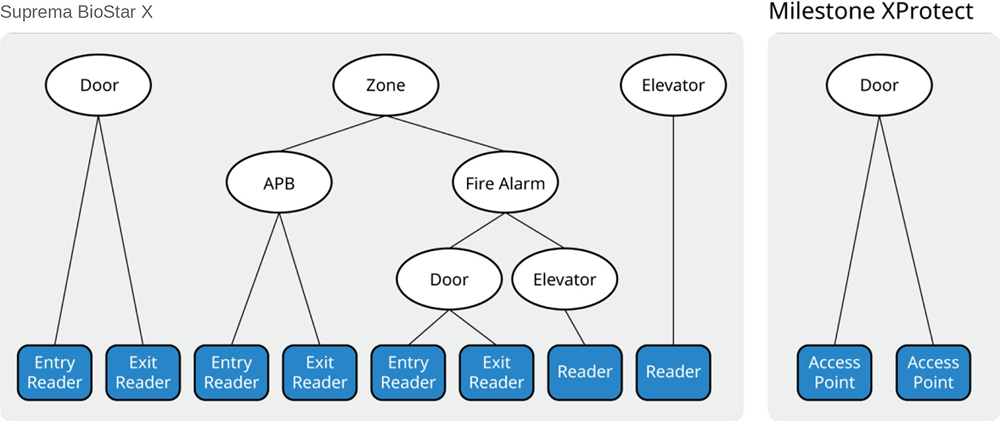
BioStar X is a security platform which can manage all components for access control, but XProtect uses the simple ACU-based topology. Therefore, there are few differences between BioStar X and XProtect. For example, BioStar X's Door, Zone, Elevator has the same level as XProtect's Door, but BioStar X's element has more specified items. See below image.
Functionalities
In XProtect Smart Client, you can use below functionalities with this plugin:
-
Retrieves the user (cardholder) from BioStar X.
-
Retrieves the door from BioStar X.
-
Retrieves the zone from BioStar X.
-
Retrieves the elevator from BioStar X.
-
Displays the status of the door in real-time.
-
Displays the access control event in real-time.
-
Displays the access control alarm of BioStar X.
-
Acknowledges the access control alarm of BioStar X.
-
Controls the door status of BioStar X (Clear Alarm, Clear APB, Open, Lock Door, Unlock Door, Release Door).
-
Controls the zone status of BioStar X (Clear Alarm, Clear APB).
-
Controls the elevator status of BioStar X (Clear Alarm).
-
Links doors and cameras to monitor them together.
-
Allocates and monitors the door, zone, and elevator with Maps.
-
Generates a report on access control events.